
If you’re using Squarespace 7.1, check out How To Link Folder Navigation Title To a Specific Page on Squarespace 7.1
The following code added as a title to the folder used to work in the past, but there was an update on Squarespace end, and unfortunately this little trick no longer works:
<a href="/PAGESLUG">NAME</a>
Luckily, there is an equally easy solution! This works with Brine family templates.
Step 1:
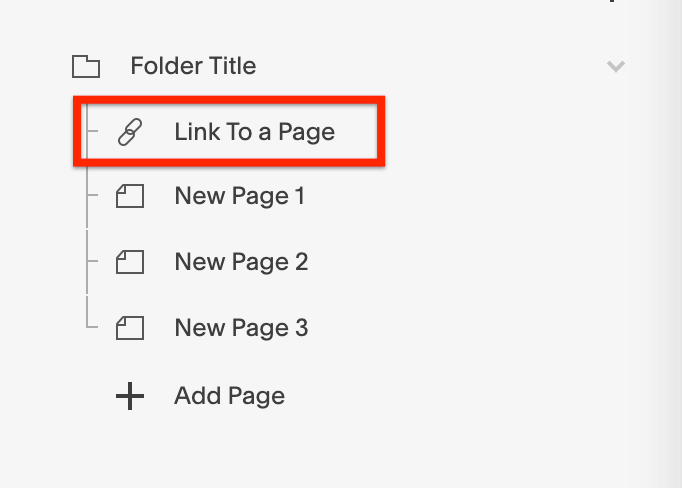
Add a Navigation Link as a first item under the folder and set it to link to the page you want your folder title to link to.
Step 2:
We need to hide this link in the folder drop-down menu and also on mobile menu. To do so, navigate to Design > Custom CSS and paste the following code:
a.Header-nav-folder-item:first-child {
    display: none;
}

a.Mobile-overlay-folder-item:nth-child(2) {
  display: none;
}
That’s it! The Navigation Link added to the will no longer be visible, but folder title will link to this page.
Have a question? Post it below!